
Sample the extremes on purpose
Capture a handful of frames at the darkest hour and the thickest weather you intend to allow, and look at them, before committing to a long run.
A detector trained at midday meets dusk for the first time in production. Varying the sky is the cheapest robustness you can buy from a rendered scene, because the geometry does not move and the labels do not have to be redone. It is also the place where a capture most easily produces frames that pass every check and show nothing at all.
Shifting brightness, contrast and hue on a finished image is cheap and worth doing, and it is a different thing. It moves the pixels of an image that was lit one way. It cannot add the long shadow that a low sun casts across a road, or the specular sheet that wet tarmac becomes, or the way fog removes distant objects entirely rather than dimming them.
Changing the sky before the frame is rendered changes what light does in the scene. The shadows move because the sun moved. The reflections appear because the ground became wet. Those are the cues a detector actually keys on, and no post-process invents them.
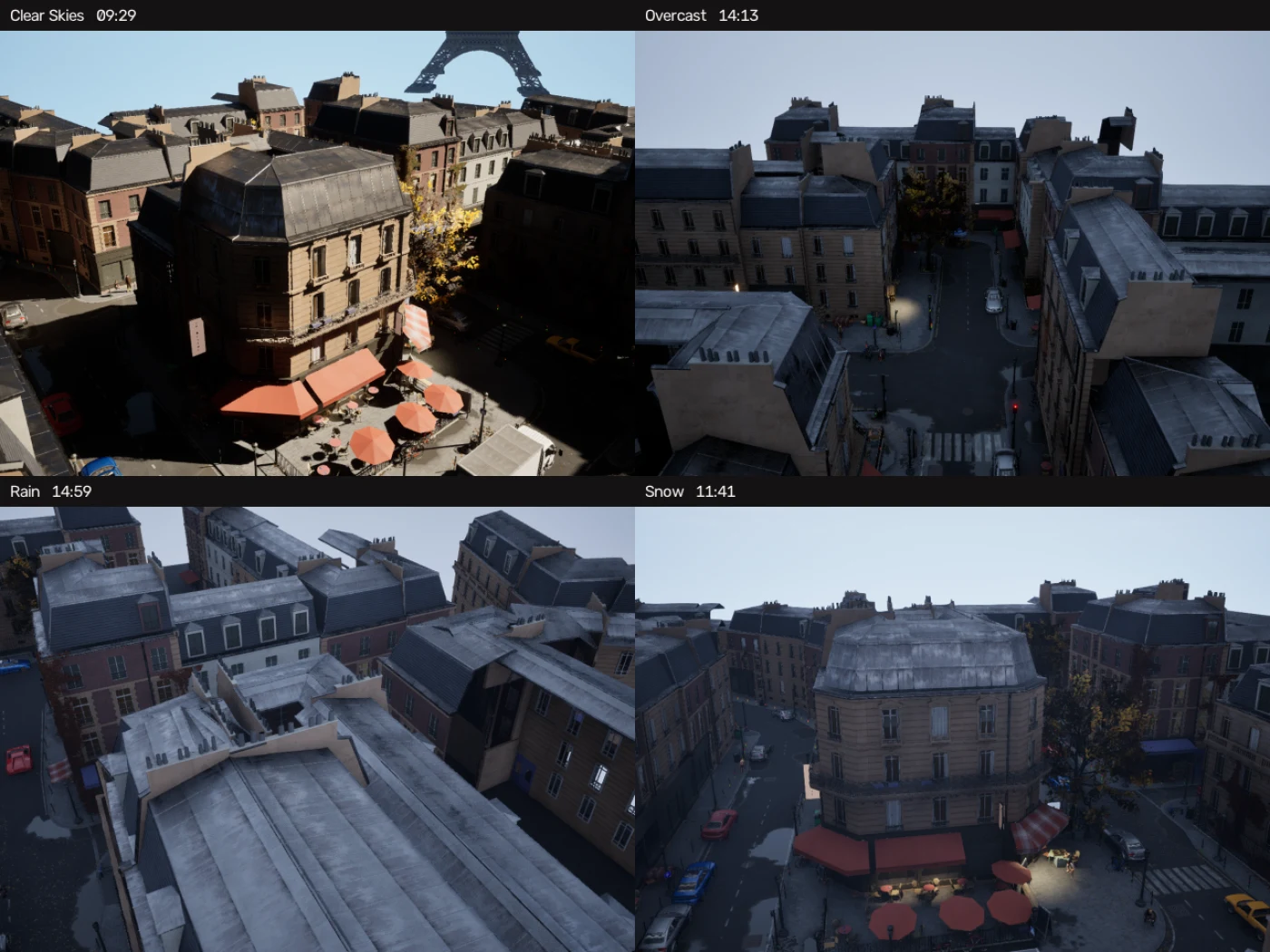
Give every available preset equal weight and you will get a dataset shaped by how many presets your sky system happens to ship rather than by what your model will meet. On the capture above, eleven presets were weighted evenly and only two of them are sunny, so thirteen per cent of the run is, and ten frames out of three hundred have a clear sky.
That was not a choice anybody made; it was the default falling out of a list. If your deployment is a sunny country, that dataset is mostly wasted. Weight the mix to the world the model will work in, and write down what you chose, because the next person to look at the corpus will assume the distribution means something.
The same applies to the hour. Sampling uniformly between two times sounds neutral and is not: the ends of the range are twilight, so a uniform draw over a twelve hour window spends real budget on frames near darkness.
This is the part worth taking seriously before you run three hundred frames.
A visibility threshold measures how much of an object is hidden by geometry. Fog is not geometry. Neither is dust, or shadow, or a dark hour. An object sitting in any of them is scored fully visible, its label is correct, and a human cannot confirm it by looking. On the capture above, one sampled instance in ten was invisible in the photograph while being perfectly labelled.
Two presets were dropped from that capture for this reason: a sand-storm frame carried thirty-two labelled instances and showed an empty brown rectangle. The labels were right. Nobody could check them, so they were not published.
The lesson generalises past any one tool. If your capture includes heavy weather, look at the frames rather than at the counts, and decide deliberately whether a frame nobody can audit belongs in a training set.
Capture a handful of frames at the darkest hour and the thickest weather you intend to allow, and look at them, before committing to a long run.
Average the brightness of the pixels each mask covers, not of the whole frame. A dawn image with a bright sky averages fine while its street is black.
Dropping weak frames when the dataset is assembled keeps the capture complete and keeps the decision reversible. Filtering during the capture throws them away.
The sky is usually driven by a third-party Blueprint, which means the capture is setting properties on somebody else’s actor. Two habits make that safe.
Record what was actually applied, per frame, not what was requested. A preset that failed to apply and a preset that applied look identical in a dataset unless the frame says which happened.
Refuse an unmapped preset rather than substituting one. A run that quietly renders clear skies where the metadata says snow produces a corpus that looks correct and is not, and no downstream check will ever catch it.
The sky and weather actors in your level are named in the job, along with the properties to drive and the presets to draw from. Nothing is assumed about which sky system you use, and a preset with no asset behind it stops the run instead of being silently replaced. Each frame records the actor found, the properties matched and the values applied.
environment:
  weather_driver: dynamic
  dynamic_weather:
    - role: weather
      actor: My_Weather_Actor
      params:
        Weather: [clear, overcast, rain, snow]
      presets:
        clear:    /Game/Sky/Presets/Clear.Clear
        overcast: /Game/Sky/Presets/Overcast.Overcast
        rain:     /Game/Sky/Presets/Rain.Rain
        snow:     /Game/Sky/Presets/Snow.Snow
    - role: sky
      actor: My_Sky_Actor
      params:
        Time of Day: [900, 1700]