

The rendered image
What a camera in that position would have seen, at whatever quality settings the run declared. Lens effects, weather and exposure are part of the render, not applied afterwards.
A game engine already knows where everything is. It has to, or it could not draw the frame. Synthetic data generation in Unreal Engine is the practice of reading that knowledge out as labels instead of paying a person to guess at it afterwards. This page explains how that works, what it produces, and where it stops being useful.
Most of the phrase “synthetic data” on the internet is about tabular records, privacy, or text generated by a language model. This page is about none of those. In computer vision, synthetic data means images rendered from a three-dimensional scene, together with the labels that describe what is in them.
The reason to use a game engine for it is not that the pictures are pretty. It is that the labels are free. To render a frame, Unreal already resolved which object owns which pixel, how far away it is, and where the camera was standing. A renderer that did not know those things could not produce an image. Synthetic data generation is mostly the work of catching that information on its way past.
Consider what annotating one aerial frame by hand actually involves. The reference capture used throughout this site averages 109 annotated instances per frame. A careful annotator draws a box in a few seconds and a mask in rather longer, so a single frame is an hour of work, and they will still miss the barrel that is two-thirds hidden behind a crate, because they cannot see it either.
The engine can. It knows the barrel is there, how much of it survived occlusion, and exactly which pixels belong to it rather than to the crate in front. That is the difference between an annotation and a measurement, and it is the whole argument for generating data this way.
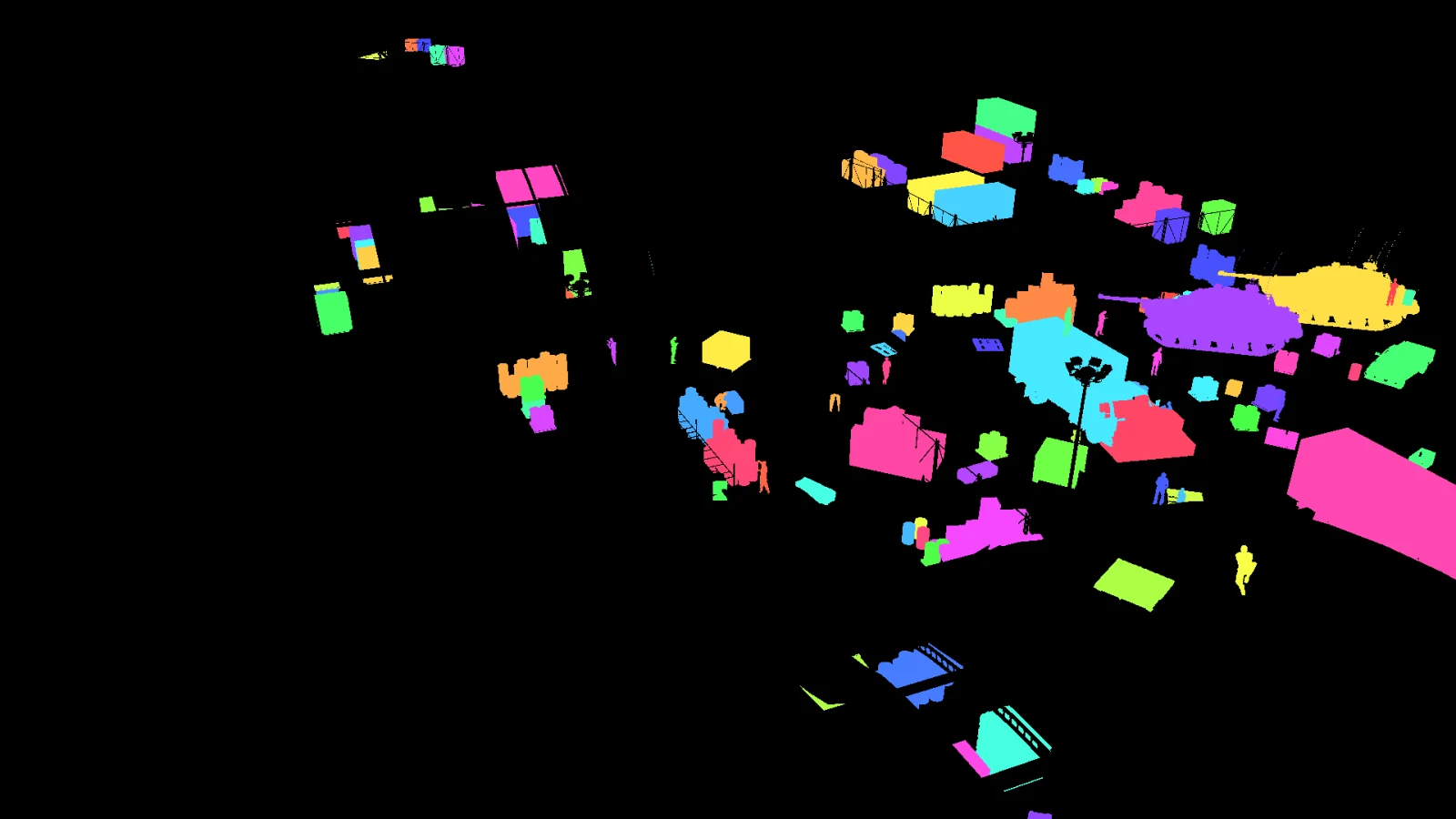
Four modalities, one render. They are not four passes over the scene; they are four questions asked of the same frame, which is why they agree with each other pixel for pixel.
What a camera in that position would have seen, at whatever quality settings the run declared. Lens effects, weather and exposure are part of the render, not applied afterwards.
Derived from the identity buffer rather than estimated, so an object that is half hidden gets the box for the half that is visible. In the reference capture, 168 instances touch a frame edge and are marked truncated instead of being silently trimmed.
Every object gets its own colour in a dedicated buffer: 289 colours across 289 classes, no collisions. Instance masks answer “which one is this”, class masks answer “what is this”, and both come from the same pixels.
Depth is written as float metres per pixel, not as an 8-bit visualisation. In the reference frames, objects sit between 33.2 and 187.8 metres from the camera.
Camera position and rotation, 64° horizontal field of view, intrinsics exported, and the position of every actor in the scene in metres, per frame.
What was requested, what was placed, what was refused and why, hashed per frame. Across the reference run: 3,360 placements requested, 3,360 accepted.
A thousand frames of the same view is one frame, repeated. Variation has to be generated deliberately, and it has to be generated in a way you can describe afterwards.
Two things vary between frames: where the camera is, and what is in front of it. NameFrame treats both as authored constraints rather than global randomness. You draw camera zones in the level, and the camera is sampled inside them; you draw spawn zones, and objects are placed inside those, subject to spacing, slope and exclusion rules.
The reference capture used 4 camera zones with a look-at target, and refused any placement closer than 1 metre to its neighbour or on ground steeper than 12 degrees. Those constraints are visible in the output: the measured minimum spacing across 3,360 placements is exactly 1.00 metres.
A camera placement that cannot see enough of the scene is rejected and resampled rather than captured and thrown away later. Across 40 accepted frames, 181 camera placements were tried, which is the cost of insisting every frame is worth keeping.
Generating a million labelled frames is easy. Knowing whether they are correct is the hard part, and it is where a synthetic pipeline either earns trust or quietly loses it.
Two kinds of check run on a finished capture. Quality gates ask whether the dataset is usable at all: empty frames, missing files, black renders, instance counts. Verification checks go further and ask whether the labels agree with the geometry that produced them, by projecting recorded actor positions and testing them against the blobs in the identity buffer.
On the reference capture, twelve of thirteen passed. The one that did not found three visible people with no bounding box, out of ninety inspected, because their pixels were claimed by a neighbouring instance. That failure is published on the dataset quality page along with everything else, because a pipeline that only reports its successes is not telling you anything.
One without code, one entirely in code. Both write the same evidence.
NameFrame Studio is a panel inside the Unreal editor. You draw the zones, assign actors to classes, press Validate, run a smoke test, then generate. There is no Python, no YAML and no terminal in that path, and the Studio writes the same job file the command line would have written.
110 commands cover capture, labelling, export, validation, comparison and evaluation. There is also a REST API and an MCP server with 38 tools for agent-driven work, of which 10 are gated behind explicit approval.
# capture from a running editor, then derive labels from the identity buffer
nameframe capture-unreal job.json --remote-url http://127.0.0.1:30010
nameframe label  _out/run1/dump _out/run1/labels
nameframe verify _out/run1/dump

# export to YOLO and COCO, then grade the result
nameframe dataset  _out/run1/dump _out/run1/dataset --format yolo,coco
nameframe validate _out/run1/dataset --out _out/run1/validationSynthetic data is a tool with edges. Here are the ones that matter, stated before you find them yourself.
A render is not a photograph. Sensor noise, lens imperfection, motion blur and the sheer messiness of the world are approximated at best. How much that costs you depends on your task, and the honest answer is that you have to measure it.
A model trained on one map learns that map. Variety in the output requires variety in the input: more scenes, more assets, more conditions. The tooling makes that cheap to run, not free to author.
Two objects sharing a colour would merge into one instance. The pipeline checks for this on every run, and on the reference capture found no collisions across 289 colours, but the check exists because the failure mode is real.
2,263 of the reference capture’s instances are small by COCO’s definition. Synthetic data gives you as many of them as you like; it does not make a detector good at them.