Turn masks into boxes
Per instance masks are where honest bounding boxes come from, including for partly hidden objects. How the boxes are derived.
Two different things get called a segmentation mask, they are exported differently, and asking for the wrong one is the most common reason a dataset has to be regenerated. This separates them, then covers the four ways the export goes wrong quietly.
A semantic mask paints every pixel with its class. Every car is the same colour. It answers “what is this pixel” and it is what you want for road scene parsing, land cover, anything where objects of a class are interchangeable.
An instance mask gives every object its own id. Two cars parked together are two different values. It answers “which object is this pixel”, and it is what you need for counting, tracking, per object boxes, and for deciding whether one thing is hidden behind another.
You cannot recover the second from the first. Two adjacent cars in a semantic mask are one blob, and no amount of post processing reliably splits them. Deciding this after the capture means capturing again.
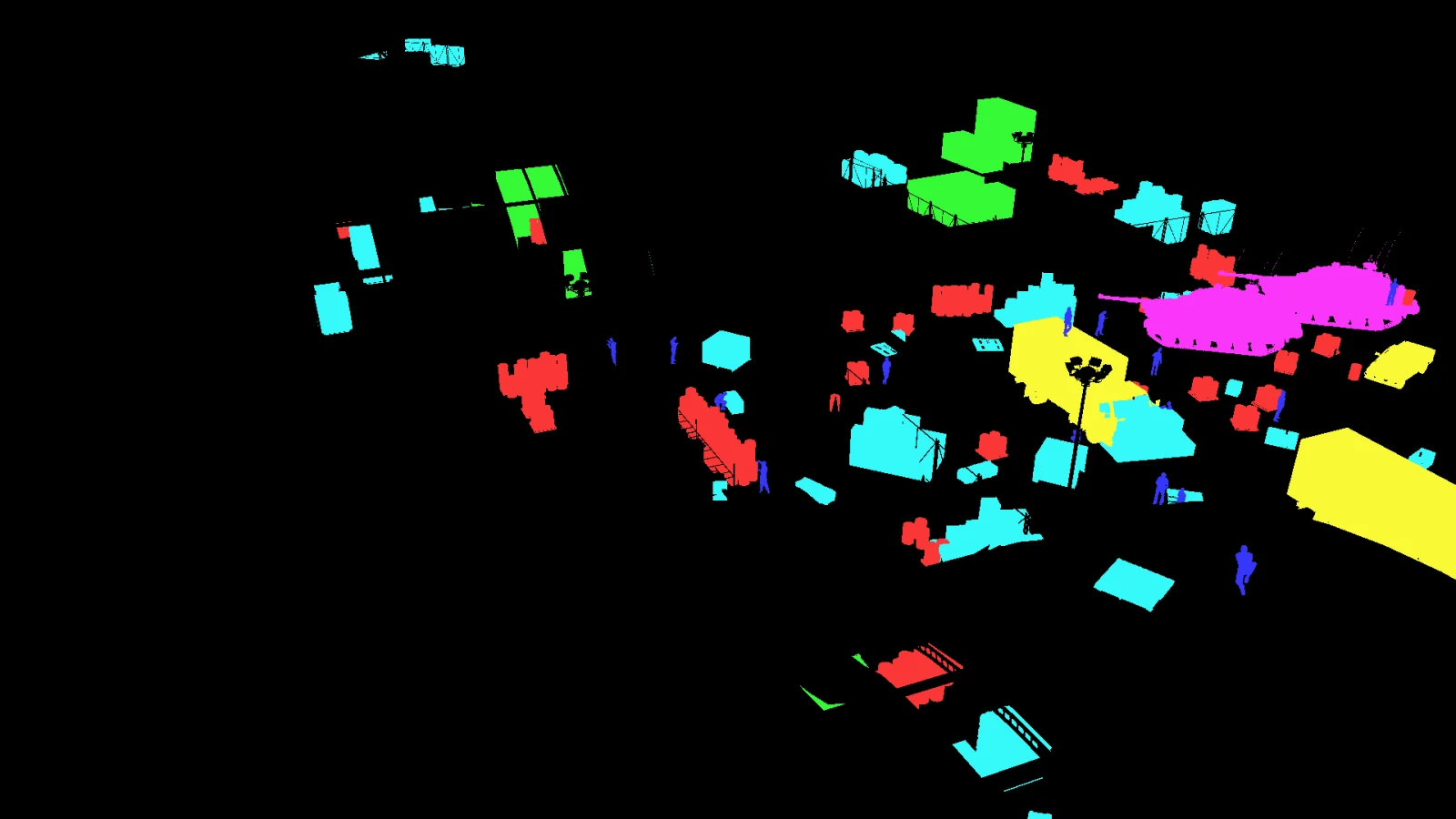
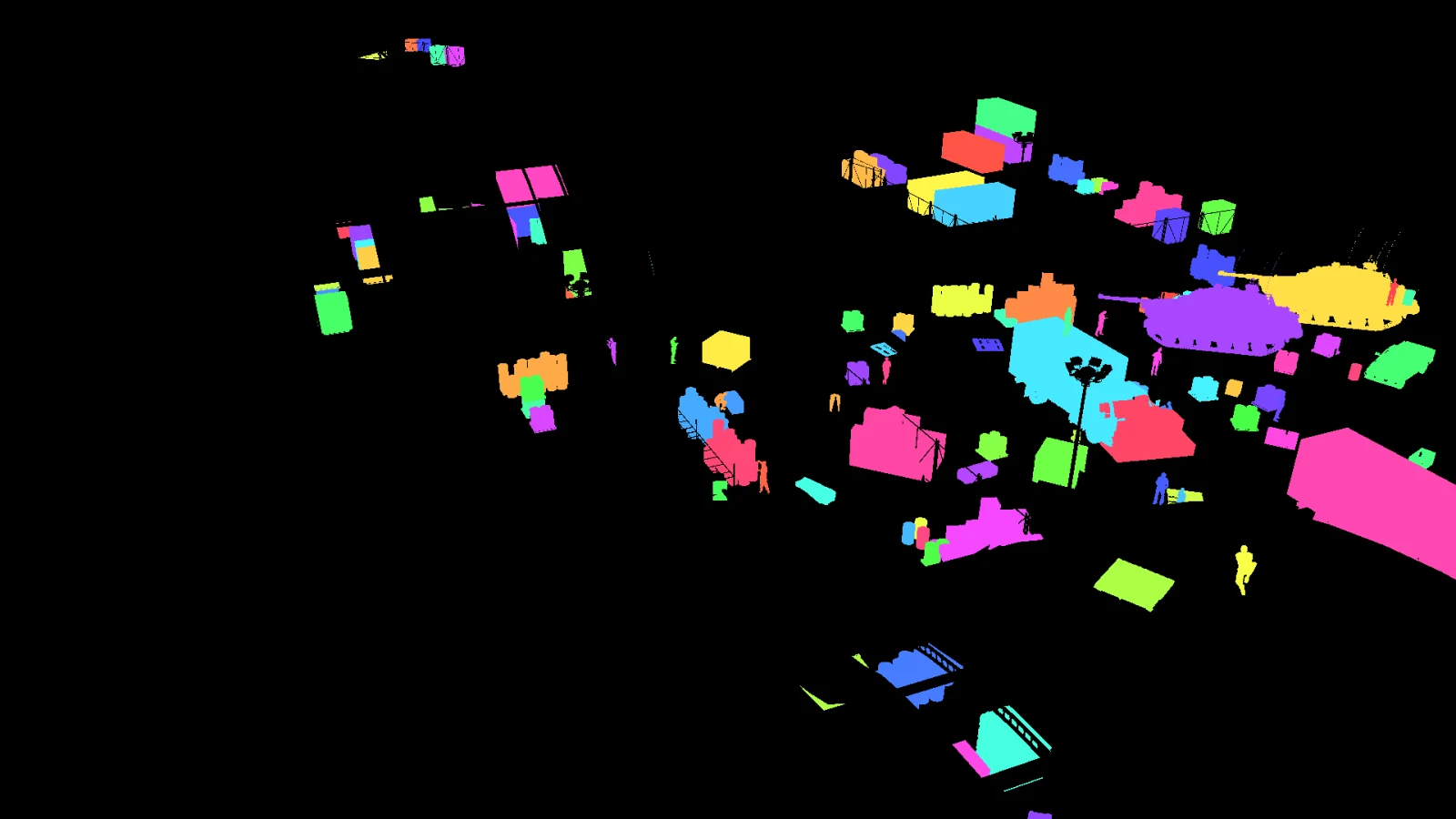
Same frame, same moment, two different questions. In the first, every crate is the same colour. In the second, all 41 of them are different. That is what makes them countable.
The usual recipe assigns each actor a CustomDepthStencilValue and reads it in a post process material. The field is a single byte, so it holds 0 to 255, and 0 means no object. That is fine for a dozen classes and immediately insufficient for instances: this frame alone has 105 objects, and a real capture run has thousands across its frames.
Worse, it fails by wrapping rather than by complaining. Object 256 comes back as object 0, which reads as background, and the mask looks entirely normal. Any approach built on stencil values is a semantic approach whether or not that was the intention.
The mask is written as a PNG in BGR order, because that is what the engine hands over and converting it would mean re-encoding every frame. Read it with a library that assumes RGB and the channels swap: your barrel class becomes your tank class, consistently, in every frame. Nothing errors, the dataset trains, and the classes are wrong.
Read it with OpenCV, which gives you BGR as stored, or swap the channels deliberately after loading. Never read a segmentation PNG with a library whose channel order you have not checked.
If the mask pass is rendered with anti-aliasing on, the renderer blends the colours of neighbouring objects along every edge. Those blended pixels are not any class. They are a colour halfway between two ids, and if you look up ids by exact colour they vanish, while if you look them up by nearest colour they are assigned to whichever neighbour won a coin toss.
The mask pass has to be rendered without anti-aliasing, without motion blur, without bloom, and without any post process that touches colour. It is an index buffer stored in an image file, and treating it as an image is what breaks it.
A window, a chain link fence, a glass panel: the pixel genuinely contains two objects. Whatever the mask says is a choice rather than a fact. The options are to write the nearest opaque surface, to exclude the material from the pass, or to label the translucent thing as its own class. What you must not do is leave it unstated, because whoever trains on it will assume the first.
A mask can look right and be wrong, so the check has to be numeric. Count the distinct ids in the mask and compare with the number of objects the scene says are visible. If those two numbers agree, the mask is fine. If they do not, the table below says which way to look.
| Symptom | Usual cause |
|---|---|
| Fewer ids in the mask than objects in the record | Objects fully occluded, or ids wrapping past 255, or the object is smaller than a pixel |
| More ids in the mask than objects in the record | Anti-aliasing on the mask pass, blending edges into colours that are not ids |
| Ids present but assigned to the wrong class | The mask was read as RGB when it is stored as BGR |
| An object is in the mask but has no box | The label pass and the mask pass ran on different frames or different poses |
That last row is worth dwelling on. If the capture renders the mask and computes the labels at two different moments, anything that moves between them, an animation, a physics step, a wind gust in the foliage, puts the mask and the box in different places. It is invisible on a static scene and obvious the moment anything walks.
Per instance masks are where honest bounding boxes come from, including for partly hidden objects. How the boxes are derived.
Every published capture ships seg.png per frame with its instance registry. Download one and open it.